In this blog, we will discuss about NSX-T multi-tenancy framework. NSX version 4.1 introduced multi-tenancy support which allows flexible resource allocation and management with features Projects and VPC.
NSX multi-tenancy support multi tenant configurations on single NSX platform which enables isolate network & security configuration across tenants. Projects in NSX assigns different spaces to different tenants to consume their own objects, see alarms related to their own configurations.
Projects relates to Tenants which provide multi-tenancy at management plane or layer.
In multi-tenancy environment, Users in each project have access to object that created in project and can consume default space objects, if shared by Enterprise Admin as read only object.
Introduction to Project and VPC
Projects in NSX
In NSX, projects provide isolated management view for tenant user /project admin. Project represents a logical container of network and security resources that can be managed by Project specific users. NSX Project can include Tier-1 Gateway, DFW, Gateway firewall, NAT,etc.
Projects can have their own objects, configurations, VMs and monitoring (Alarms and logs). You can create multiple projects to provide multi-tenancy and those projects can leverage shared infrastructure services like syslog. To isolate different project logs short log identifier can be used. During NSX Project creation workflow, short log identifier can be set which helps to separate logs and alarms in multi project setup.
Note: Short log identifier can be set during project setup and can’t alter later. NSX have limit of maximum 8 character to define identifier.
Project leverages Tier-0/VRF gateway created in default space and Tier-0/VRF can be shared with multiple Projects. Projects can have dedicated Tier-0 gateway.
In default space, Enterprise admin create multiple tenants with different projects. Enterprise admin can have consolidated view of all projects. In specific project view NSX configurations like system, Tier-0 gateways are hidden to restrict NSX system wide objects. Please refer sample project screen view where you can validate, Tier-0 gateway is not visible in Networking tab.
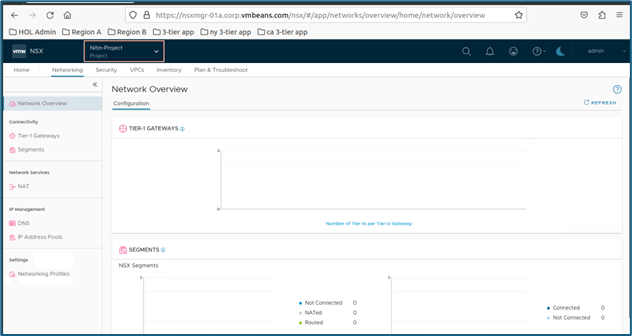
Figure 1 : NSX Project UI
In NSX project, Enterprise admin can define quota to limit resource consumption. You can define limits in quota and then assign to projects. One quota can be shared with multiple projects and there are 4 objects which can be controlled via quota are Networking, security, VPC and inventory.
Enterprise admin can create firewall rules system wide that apply to all VM across all environments. Project admin/users can also apply firewall rules which have scope to their projects only. Tenants cannot manage platform setup like upgrade, install because those features are kept under Enterprise admin. You can refer above diagram where system tab is not visible from project specific view which enables you to initiate upgrade or installation workflow.
When a project is created, a NSX group representing that project is also created with DFW rules which allows communication inside project but blocking anything else. Project admin can manage their own rules by changing default project rules Those rules will only apply to VMs connected to segments for their project. Group created by system during project creation follows naming conventions: ORG-default-PROJECT-Project name-default.
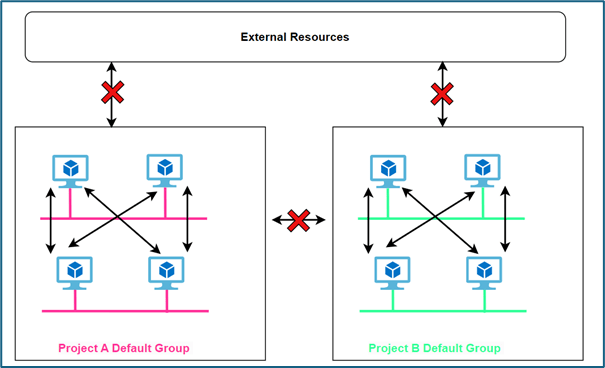
Figure 2 : Project Default NSX Group
In our environment, we have added 2 projects with name project 1 and project 2 respectively. We have also mapped 2 users project1-admin and project2-admin with role project admin with both projects respectively. Refer below screenshot to get configuration view. We will validate default object group creation and DFW rules which gets created during project creation to provide isolation.
Login to NSX Manager and click on default space>> All projects to get below screen.
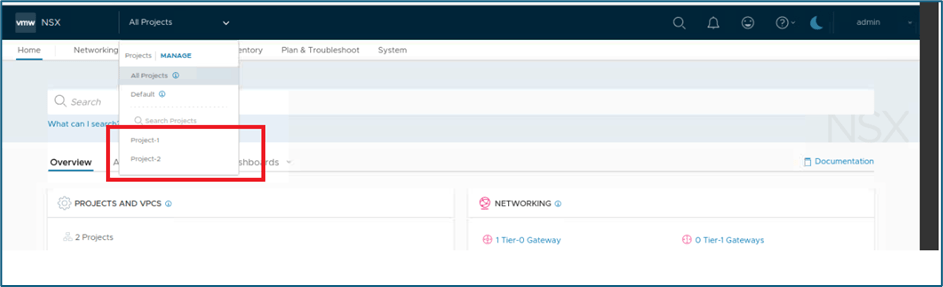
Figure 3 : NSX Projects view
Click on Manage if you want to edit project configuration like add user configuration etc.
To validate assigned users to project Click on Manage and new window will open. Click on users to validate user attached with project and role.
In our scenario, we have attached project1-admin with project admin role.
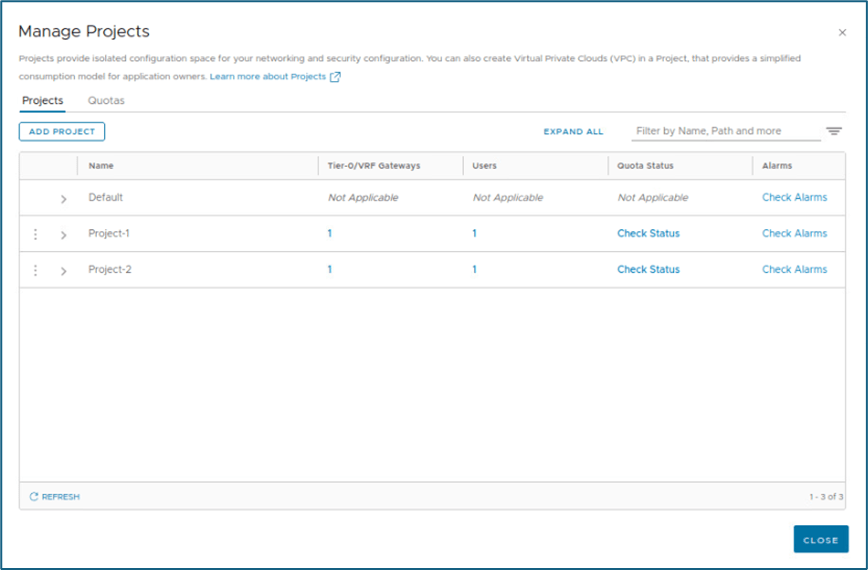
Figure 4 : Project and Quotas
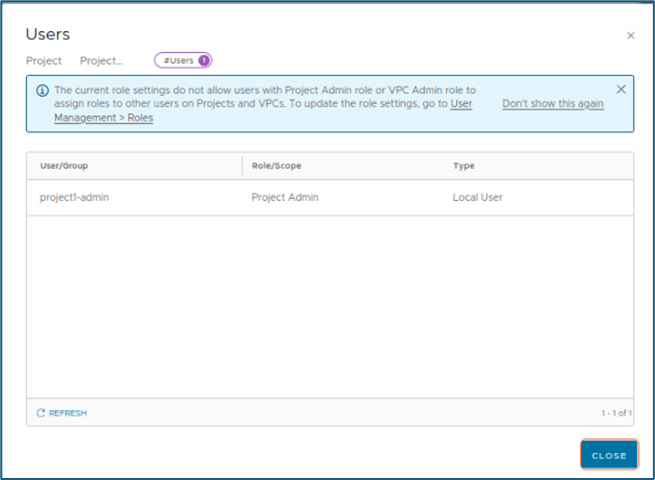
Figure 5 : Users assigned to Projects
When we login into NSX-T Manager by default, we get default space/organization page. You can refer below screenshot and we are logged with admin
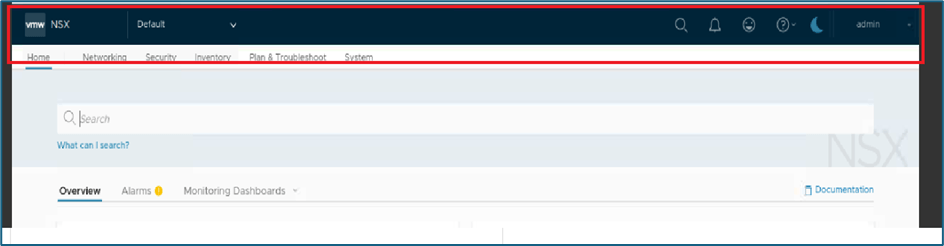
Figure 6 : Default space
NSX objects created during project creation will not be available in default space. You have to click on All projects option or specific project to see groups else you can login with project admin user to get view.
Validate NSX Groups and DFW rules
We have logged in with Project1-admin credentials to validate Groups and DFW rules.
Click on Inventory >> Groups.
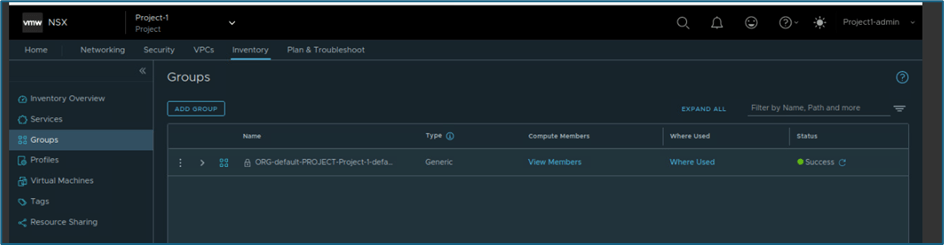
Figure 7 : NSX Groups
In NSX , New policy and rules gets created while project creation. In below screenshot you can validate that in DFW, Default-group to default group is allowed for any port and other communication is blocked. These rules enable isolation at project level.
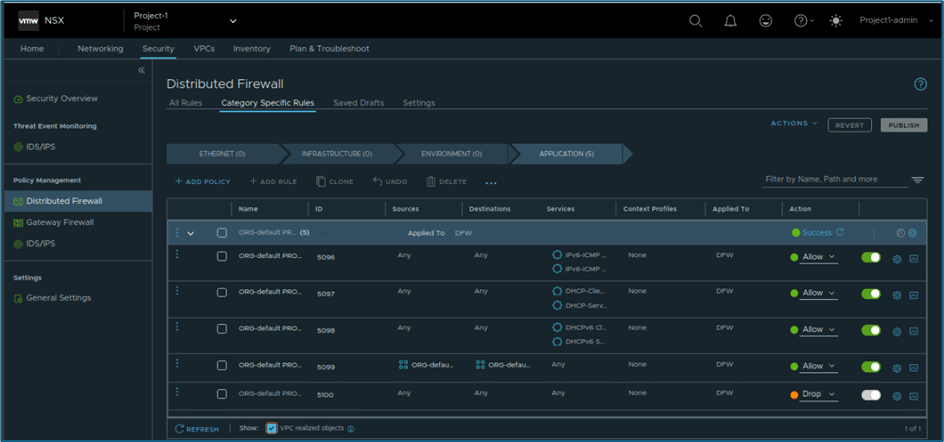
Figure 8 : Project DFW rules
Any configuration like segment creation in NSX, automatic adds to that default group which enable isolation between project and external resources.
Project admin in Project 1 can view another project objects but that will be only read only like project 1 admin can’t create any Tier-1, segment in project2. This is happening because while associating users with project scope is limited to project level only.
NSX Projects policy model
Projects are created under /org/default to support independent set of networking and security configurations for tenants.
/org/default holds multitenancy objects and /infra holds default view which is managed by enterprise admin.
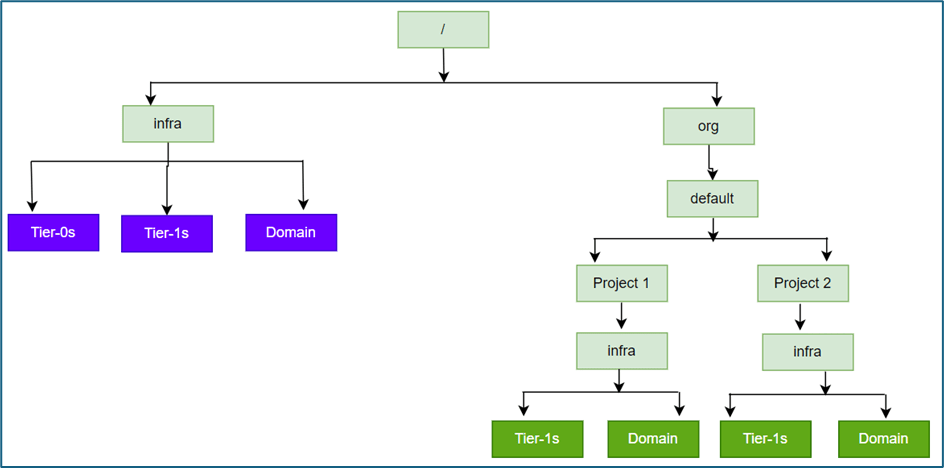
Figure 9 : Policy API for Projects
VPCs
VPCs were introduced in NSX 4.1.1 which provide additional layer of multi-tenancy with in project. VPC concept in NSX like cloud network VPC where user can create their own subnets and DFW rules without knowing underlay infrastructure.
Please refer below diagram to get high level understanding of VPC.
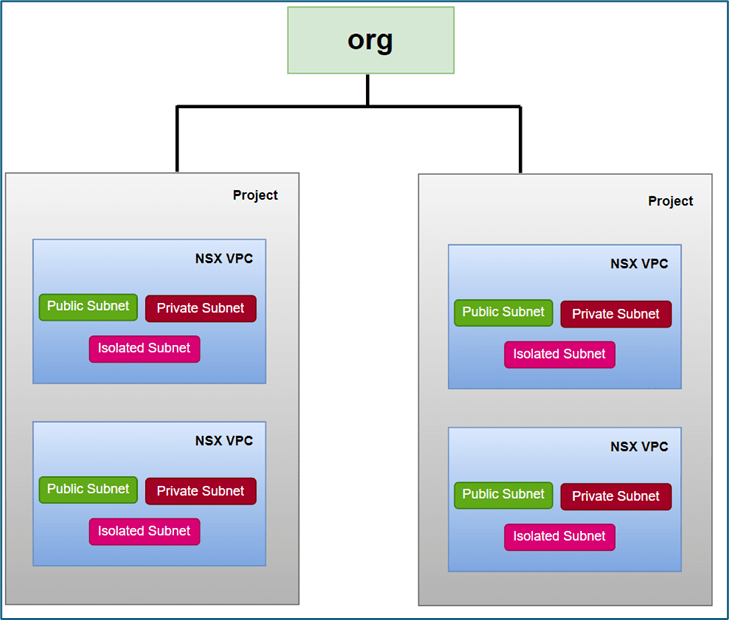
Figure 10 : Project and VPC
VPC is associated with Tier-1 gateway, whenever you create VPC Tier-1 gateway gets created with VPC name. This tier-1 gateway gets connected with Tier-0 gateway or VRF which you provide during VPC creation. Subnets in VPC are overlay segments in default transport zone of project.
VPC is logical container for network and security configurations. VPC supports 3 type of subnets (Public, private and isolated), NAT & DFW configurations.
VPC Subnets
Public Subnets have access to communicate with external world. Public Ips are allocated from External IP block assigned by project admin to VPC while creating VPC. Project inherit this external block configuration from project creation workflow.
Private subnets are created from Private block assigned to VPC. To communicate outside VPC, Private subnet use SNAT configuration where one IP get assigned from public subnet. This SNAT configuration get created automatically for whole Private IP block with 1st IP address of External block.
Isolated subnets don’t communicate with any other subnet (within VPC and outside VPC). VPC admin creates isolated subnets and doesn’t require any IP block like public & private subnet.
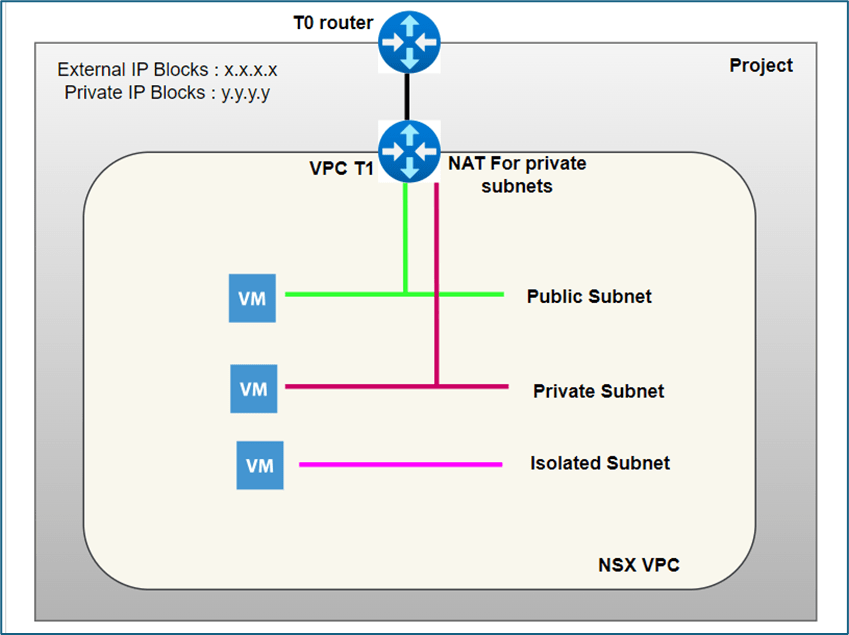
Figure 11 : Logical View of VPC subnets
VPC admin or network admin roles in VPC can create subnets in VPC. NSX VPC can also have user roles Security admin , network operator and security operator , but with their scope confined to NSX VPC .
VPC also provide access to create NAT and security rules for NSX environments. VPC admins gets access only to VPC feature and for other objects access is denied.
This concludes our blog where we discussed about NSX Projects and VPC. In later blogs we will deep dive into Projects and VPC .

 Welcome to Bytestuffs.com
Leave a reply to NSX Multitenancy : NSX Projects configuration deep dive Part-1 – Welcome to Bytestuffs.com Cancel reply