Introduction
In this blog, we will discuss and deploy Application Virtual Network (AVN) in VMware Cloud Foundation (VCF) Environment. VCF is multicloud platform that provides hyperconverged infrastructure for Modernizing datacentres and container-based applications. The Three key components of VCF are vSphere , NSX & VSAN. VCF segregate Management and application VMs with domains Management and Workload respectively. During initial bring up process, SDDC manager, vCenter , NSX-T Managers & VSAN gets deployed in Management domain.
You can deploy vRealize Aria suite for VCF environments which get deployed in Management domain. VCF leverages NSX-T for Network & Security solution.
AVN is Software defined networking on NSX that allows hosting of management applications like vRealize suite ( VRA , VRO , WSA , VRNI ) inside Management Domain.
AVN can be deployed from SDDC manager and VCF supports two types of NSX segments for AVN deployment that are Overlay-backed NSX segment and VLAN backed NSX segment.
During AVN deployment, Two AVN get created Region-A and X-Region on NSX Edge cluster deployed in Management domain. Region-A AVN hosts vRealize Aria components like vRLI , vRNI collector and X-Region hosts like VRA ,VROPS ,vRNI platform.
Please refer below diagram for high level understanding.
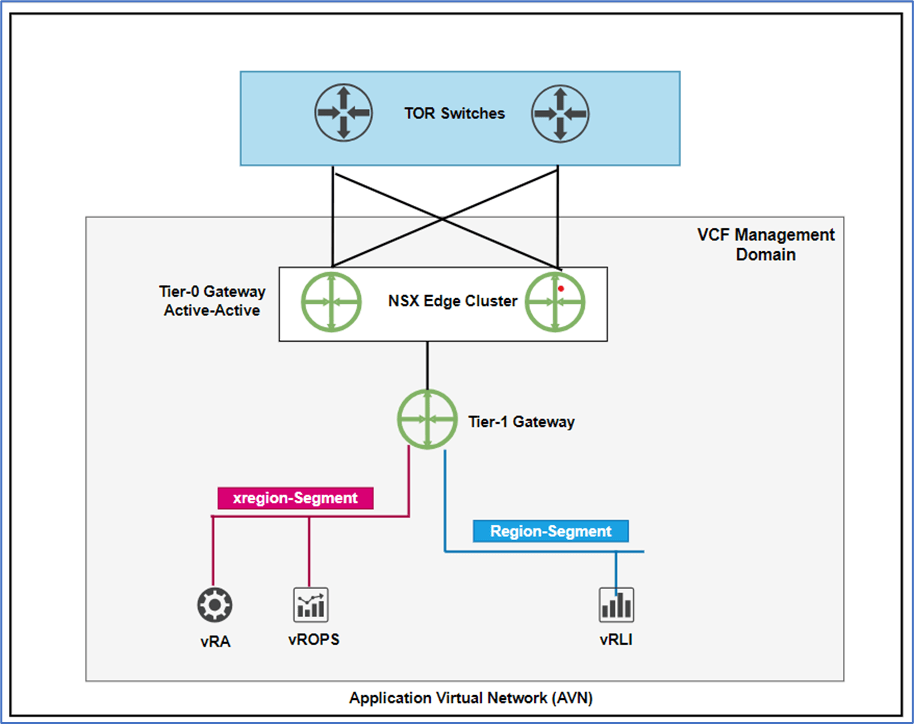
Figure 1 : AVN overview
Pre-Requisite for AVN deployments
NSX-T Edge cluster and logical routers (Tier-0 and Tier-1) must be deployed from SDDC manager prior to deploy AVN.
Note: During VCF Planning and preparing phase , VCF architect capture AVN details in Planning & preparing workbook.
AVN deployment
We will deploy Overlay backed AVN with below network details
Region-A : 10.0.50.0/24
X-Region: 10.0.60.0/24
Please refer below steps to deploy AVN
Login to SDDC Manager , Click on Workload Domain and select Management domain.
Click on Action and select ADD AVN.

Figure 2 : Add AVN
New Window will Pop-up where we have to select type on AVN : Overlay or VLAN backed. Select Overlay and click on NEXT.

Figure 3 : Select Overlay-Backed NSX Segment
In next window select Edge Cluster details and Tier-1. SDDC pulls this information from default NSX-T edge cluster details. Click on Next to process further.

Figure 4 : Select EDGE cluster and Tier-1 gateway
In next window, Provide below details for both AVN segments (Region-A and X-Region).
Name :
Network :
Subnet Mask :
Default Gateway :
MTU :
Note : For Overlay-backed segments , Gateway will get created on NSX Tier-1 gateway which was selected in previous window .

Figure 5 : Region Segment

Figure 6 : X-Region
Click Next to process further.
Review details before click on Finish.

Figure 7 : Click on Finish
SDDC manager will some time approx. (5 minutes) to finish this task. You can monitor tasks status from Recent tasks window.

Figure 8 : AVN workflow
Validation
Click on Summary tab of Management Domain to get AVN details.
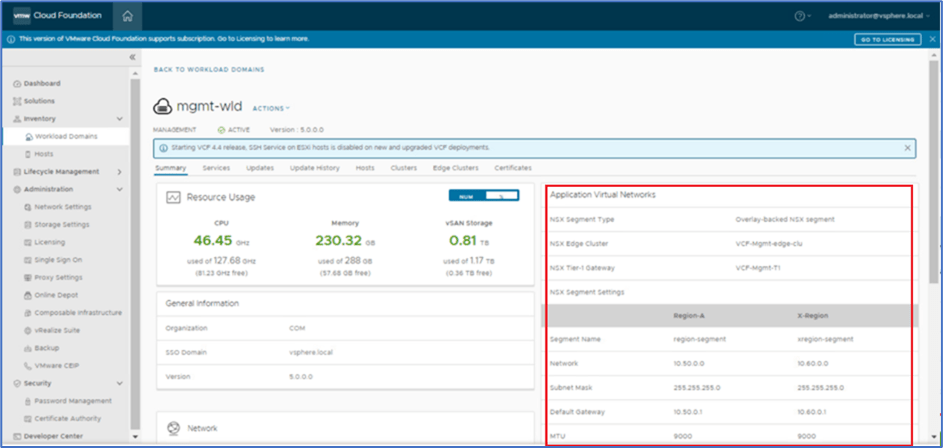
Figure 9 : AVN Validation
Login to NSX-T manager and click on segment. Validate that both AVN segments are created like below.
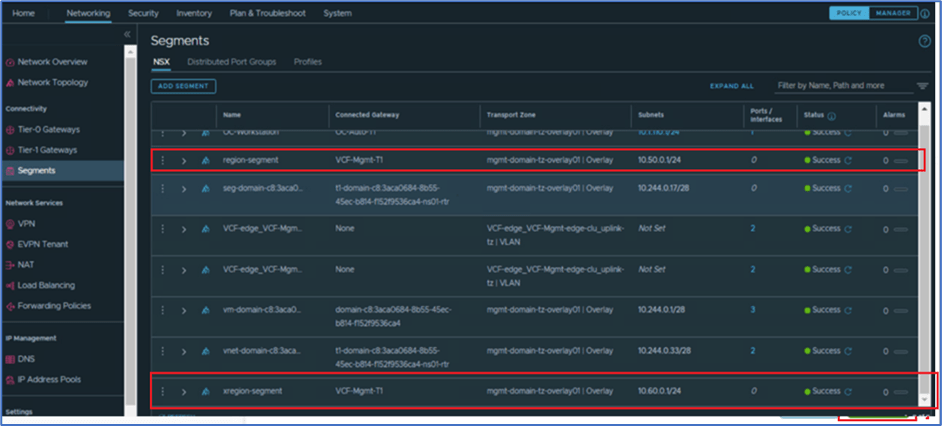
Figure 10 : Validation on NSX Manager
Conclusion
In this blog post, We discussed and deployed AVN segments in VCF environment.

 Welcome to Bytestuffs.com
Leave a reply to VCF Deployment : NSX-T Edge Cluster Deployment in VCF Management Domain – Welcome to Bytestuffs.com Cancel reply